FREE UK delivery on orders of £200 or more
Good lead collection at trade shows comes down to three things: a clear definition of a qualified lead, one fast way to record every conversation (usually the organiser’s lead retrieval app, with a notes field), and follow-up within one working day. More names do not help if nobody remembers who each potential lead was.
Below: how to collect leads at a trade show, the tools, qualifying questions, CRM setup, and UK GDPR and PECR.
How to capture leads at a trade show: quick answer
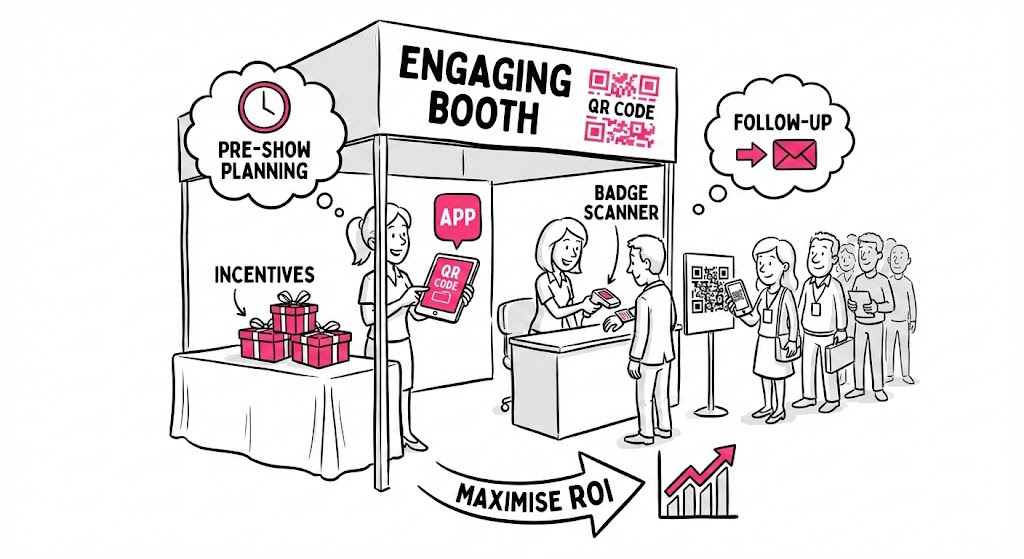
- Before the show: agree what a qualified lead is and write three to five questions the whole team will ask.
- On the show floor: scan event badges with the organiser’s app, or use digital lead capture on a phone or tablet, then add a grade and a note.
- After the show: import leads into your CRM every evening and contact the best within one working day.
Decide what a qualified lead is
A workable definition for a B2B exhibitor: the right type of organisation, someone who influences the purchase, a real need you can meet, and an agreed next step.
Then divide your total show cost by the most you will pay for one qualified lead. That is the number the show must produce, and later it is how you measure ROI. Our guide to trade show booth cost and our study of stand prices at 202 UK trade shows help with the budget.
Lead capture at trade shows: best practices and methods
Lead generation needs consistent contact capture: pick one primary method and one backup for all staff.
| Method | What you get | Best for | Watch out for |
|---|---|---|---|
| Organiser badge scanning or lead retrieval app | Visitor’s registration details in one scan, often with a notes field | Most stands at shows that offer it | Cost per device or licence, which fields you actually receive, and when access to the data ends |
| Your own form on a tablet or phone | Exactly the fields and questions you choose | Detailed qualification, demos, shows without scanning | Slower than a scan; needs Wi-Fi or offline mode |
| QR code to your own form | Visitor types their own details on their phone | Requests for a quote, guide or follow-up call | Lower completion; you lose the face-to-face note |
| Business cards | Name and contact details | Backup only | No qualification unless you write on the card straight away |
Lead retrieval: what UK shows provide
At most UK shows, each trade show badge carries a barcode or QR code and the organiser sells or includes full lead retrieval, scanning attendee badges to pull the registration data behind the badge. In rate cards captured for our UK stand cost research on 28 September 2026:
- Euro Bus Expo 2026 (NEC Birmingham) listed a lead capture app at £130 ex VAT for the first app.
- Harrogate International Nursery Fair 2026 listed a lead scanner service at £99 for the first three devices and £27 per extra device (VAT basis not stated).
- PestEx 2026 (Excel London) and ScotHot 2027 included lead scanning or an app in the package or fee.
Ask the organiser if you collect a badge scanner, what each extra device costs, which fields come through (name, company, job title, email, phone), if you can add questions and notes, and how long you can export the data.
Choosing an app: Cvent iCapture, HubSpot and what to look for
If the organiser’s app cannot hold your questions, a third-party app can. Cvent’s iCapture, for example, says it can integrate with 130+ badge providers, captures by badge scan, business card, photo or manual entry, works offline, and sends leads to Salesforce and HubSpot. When comparing event lead capture software, check that it:
- reads the show’s badges and works as a business card scanner (OCR) backup
- holds qualifying questions, lead scoring and notes via smartphone or tablet (iOS or Android)
- keeps working without Wi-Fi and can enrich lead data
- offers CRM sync, so captured leads go directly into your CRM rather than data into a spreadsheet
The right tool should streamline the workflow so your sales team can capture and manage leads in one place.
How to qualify and prioritise leads
Ask about fit (“What does your organisation do?”), need (“What made you stop here today?”), role (“Who else would choose a supplier?”), timing (“Now, this year, or researching?”) and next step (“Would a call next week help?”). Record the answers as a grade:
| Grade | Rule | Follow-up |
|---|---|---|
| A (hot) | Right fit, clear need, buying now or this year, and agreed a next step | Personal contact within one working day by the person who will handle the account |
| B (warm) | Right fit and a real need, but no timescale or no next step yet | Personal email within the week with something useful linked to the conversation |
| C (cool) | Interested but not a buyer: students, suppliers, competitors, early research | Thank-you email only where you have a lawful basis, then general updates if they opted in |
Add a one-line note to every scan, such as “Wants 3m display for March show, call Tues”.
UK GDPR and PECR rules for data capture
A badge scan gives you an attendee’s details, not permission for any marketing. The ICO’s business-to-business marketing guidance explains the rules:
- Limited companies and LLPs: PECR’s consent rule for marketing emails does not apply, but you must identify yourself and offer an opt-out.
- Sole traders and some partnerships: you need consent or the soft opt-in.
- Named contacts: UK GDPR applies, including to business card details once added to a database. Tell people at the stand what you will send, and keep a suppression list for opt-outs.
The ICO says this guidance is under review following the Data (Use and Access) Act. This is a summary, not legal advice.
How to follow up with trade show leads
| When | What to do |
|---|---|
| Each evening of the show | Export scans and forms, import them into your CRM, check that grades and notes came through, assign an owner to every A lead. |
| Within one working day of meeting | A leads: a personal email or call from their named contact, referring to the note from the stand and confirming the agreed next step. |
| Within the first week after the show | B leads: a personal email with the resource or answer you promised. Book calls with anyone who replies. |
| After the first week | C leads: a short thank-you, only where you have a lawful basis. Then normal newsletters for those who opted in. |
| Four to six weeks after the show | Review the results: qualified leads, meetings, quotes and sales from the show against your target. |
Lead management: CRM integration
To manage leads well, get a sample export (CSV or Excel) and map each column to a CRM field. Add fields for show, grade, note, owner and consent. If you are using HubSpot or another CRM or marketing automation tool, tag event data by show for attribution, then report meetings and sales per event.
Set up your stand to make capture easy
Put a counter near the front so staff can scan and type facing the aisle. Our exhibition counters include portable counters that pack into carry bags. See also our guides to designing a trade show booth and interactive trade show booth ideas.
Frequently asked questions
Can I just use paper business cards?
As a backup only. Write a grade and note on each card straight away and add it to your CRM that evening.
Can I use my own app instead of the show’s lead retrieval system?
Usually, yes, but it may not scan badges from the show, so details may have to be typed in.